SESSION INSIGHT
When master animators talk about the core principals of movement, they always stress the importance of a solid understanding of time and space. This may sound like astro physics, but it couldn’t be more simple. How an object or character moves in relation to the space around it, and how it takes advantage of time, either fast or slow, begins to tell us a lot about its nature. Is it large and lagging? Is it slender and agile? Or is it an unexpected creation that surprises the audience?
For a solid explaination, let’s look at this TED Ed short about the art of timing & spacing. Consider how these principles will affect your own work with this class.
While timing and spacing are one of the most important aspects of animation, it’s definitely not the only one you should be thinking about. There are 11 other core principles of animation that have been developed and used over the years in everything from simple 2D animations to full CGI feature films.
Alan Becker decided to start a video series dedicated to each of the 12 Principles of Animation as described by Frank Thomas and Ollie Johnston in their book “The Illusion of Life”.
1. Squash & Stretch
2. Anticipation
3. Staging
4. Straight Ahead & Pose to Pose
5. Follow Through & Overlapping Action
6. Slow In & Slow Out
7. Arcs
8. Secondary Action
9. Timing
10. Exaggeration
11. Solid Drawing
12. Appeal
The Business of Freelance Motion Design (Tales of a full service freelancer) from Michael Jones on Vimeo
Before we get into the meat of talking about realism in animation, let’s try a simple experiment. Hold up your hand in front of your face, then start moving it slowly back and forth. Now move it faster and faster until it appears blurry. This effect is referred to as “Motion Blur” and it is the reason things that move quickly appear blurred together.
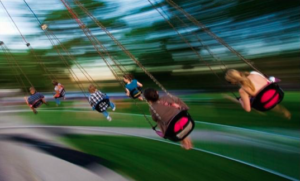 This is the exact same reason that we perceive moving pictures as one moving image, our brain can’t perceive the individual images quick enough so it averages them together. Cameras also “see” this effect when taking a picture. Whenever a camera takes a picture, it has a shutter that opens to let light in and that’s how it captures the image. If something moves while the shutter is open, the image will appear blurred.
Since this is how our eyes see things that move quickly, whenever we don’t see blurriness on objects moving fast, it looks unnatural or fake.
Motion Blur isn’t the only thing we can do to add realism to our animations. Whenever we create something, we should start to think about other ways to make it seem more real. For example, to make it look like it was recorded with an actual camera, we can add camera imperfections such as grain, lens flares, vignettes, etc. So keep that in mind as we go further.
Watch this video to see what adding motion blur to our animations can do.
Realism in Motion
Animation with the Graph Editor
Intro to Animation Curves in After Effects from School of Motion on Vimeo.
Make sure to grab the files used in this session’s tutorials!
