SESSION INSIGHT
Since the origins of man’s capture of the image, we have strived to bring these images to life. These efforts began with simple hand-drawn chalk animations, then evolved to a more systematic approach with inked and painted cel animation. All the while, these pioneering artists were still merely trying to tell stories and share ideas in new and captivating ways. Meanwhile, this medium grew into a more tactile form with stop motion animation, seeing insects come to life, mythic animals become a “reality” on the silver screen, and giant apes and monsters battle and wreak havoc on human civilization.
Television became consumed with new cartoon idols, mistresses and villain – making animation a household convention. Then the digital age of computer animation hit the industry, rattling the old forms and pushing artists into new directions of special effects and eventually feature-length entertainment. This new artform quickly jumped from the big screen and made its way into the gaming console and television screen via dynamic commercials and pop culture-hit TV series.
That brings us to the present. What does animation mean to the motion graphic artist today? It’s absolutely a critical component of what we do and how we move through our visual communications. This session isn’t so much about character animation (that will come later) as it is about the actual movement of objects and shapes, giving us a basic understanding of the intricacies of digital manipulation of these things over time and space.
On the subject of computer animation and motion graphics, we need to jump back in time and have a look at some of the pioneering efforts and discoveries in the early years. First, watch this film about the GENESYS computer-mediated animation system that was built by Ron Baecker in 1969.
Then let’s look at some works by pioneer computer animator, John Whitney, who started using computing machines to create abstract films in the 1950’s. If it wasn’t for this artist and engineer, the world of digital motion graphics would be a much more primitive place. We owe a great deal to his spirit of experimentation and insight. Please take a look at these films by Whitney:
MATRIX III
ARABESQUE
VERTIGO titles in collaboration with Saul Bass
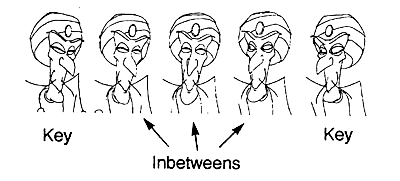 The term Keyframe goes back to the early days of film and animation. The keyframe signals the start and end of on-screen animation. The use of keyframes in animation was popularized by the bigger studios like Disney, where many of the principles of animation were worked out.
In those days the senior animators would come in at the start of the day and create the frames that were the start and end of certain movements and scenes (keyframes.) Once they finish creating these frames, they would put a junior animator to work out the “inbetweens”, the intermediate frames between the keyframes that give the animation movement. These junior animators have been called “Tweeners,” for the type of time intensive work they were assigned to do. The term “tween” has become common in various digital programs such as Flash and Photoshop, where that process of filling in the gaps still exists, only by the computer.
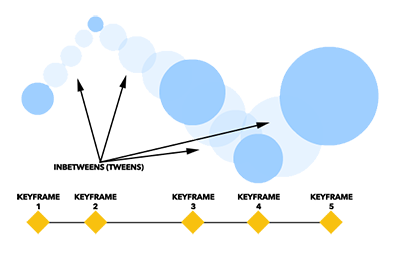 These days, keyframes in animation mean something a bit different, yet the same concepts apply. The computer programs we use to execute our animations use keyframes to record information/data in order to process the changes in position, scale, rotation, etc. and make objects come to life. Keyframes in After Effects are absolutely critical if an artist wishes to see movement or other changes of properties, but some advanced designers can bypass this step with Java-based scripting known as “expressions,” but that’s a long ways away for us.
The great thing about computer processing and animation is having the computer do much of the busy work for us. We just need to comprehend the essential properties of time and space. This has a big impact on the speed and rhythm of our work. The greater distance between keyframes in a timeline, the longer the change will take to happen, and the opposite is true. We will look at spacial and temporal relationships of keyframes and our animated objects in the tutorials.
For a different take on how keyframes are so important, let’s look at this short video by Dan Root, using video games as an example.
Color truly is a make-or-break component in design. Too many times do we see work created by an artist who has not taken the time to “smell the roses,” or in this case, look at them. Everyday we take in so much color information, but so few of us really stop to digest and reflect on what works, what doesn’t and what makes you “feel.”
This next video will help you understand more about this critical element, but there is a lot more out there to explore and learn…
And if you want some science and great animation to help with the explanation of what color is… :
For this session’s tutorials, you will need to use the materials provided in order to follow along.
